 GoalNav Manual
 In This Chapter
Source Data Verification
NOTE: This section only applies for those studies that allow source data verification to be completed by the sites alternate GAS interviewer.
A visit completed on a paper form must be entered into GoalNav® by the GAS interviewer who completed the visit. The alternate GAS interviewer at the site must verify that the data has been entered accurately into GoalNav® and complete a Source Data Verification signature. GoalNav® does not allow any user who authored the data in GoalNav®, to perform SDV on the same data.
Follow these steps below to complete a source data verification signature:
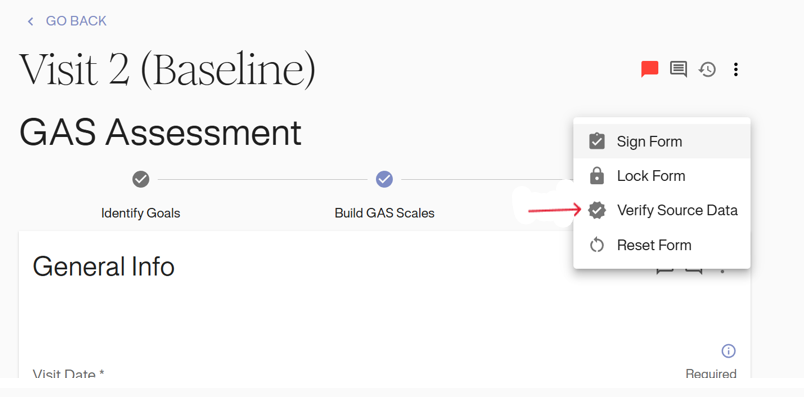
The following is an example of a GAS interviewer completing source data verification for a baseline visit GAS assessment form.Click on the options icon (⋮) next to the name of the Baseline form. Locate “VERIFY SOURCE DATA” from the dropdown and click on it.
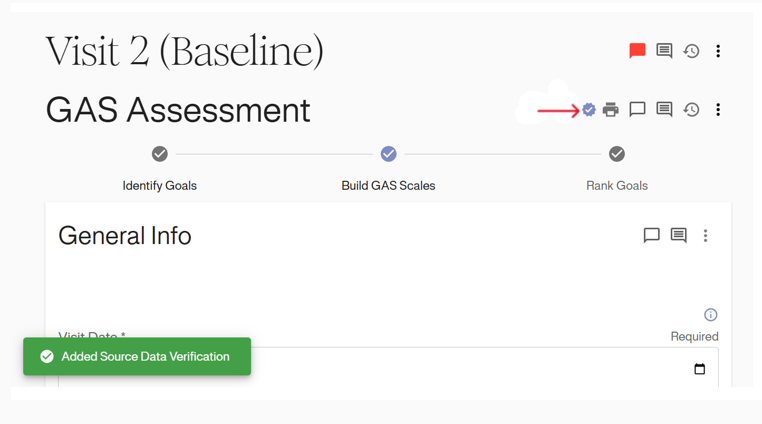
This will authenticate the user. The “Added Source Data Verification” status will be displayed at the bottom of the screen, and a blue tick icon will appear right next to the form, as shown below.